



Financial Reports Guide for STR Property Managers
Most property management software will generate reports. But knowing *which* reports to run, *when* to run them, and *how to read* what they're telling you. That's where most short-term rental operators fall short. This guide covers the seven core financial reports every STR property manager should understand: what each one shows, when to use it, and what to look for inside it.
1. Income Statements
An income statement (also called a profit and loss statement when expenses are included) shows total revenue earned over a specific period, typically a month, quarter, or year.
What it tells you: How much money came in from all sources: reservation income, cleaning fees, extra services, and any other revenue streams. Unlike an owner statement (which shows what one owner earned), an income statement reflects the entire portfolio or a specific property.
When to run it: Monthly at minimum. Compare month-over-month and year-over-year to catch seasonal trends and revenue anomalies early.
What to look for:
- Significant drops in any revenue category between comparable periods
- Cleaning fee revenue that doesn't scale with booking volume (a sign of inconsistent fee collection)
- Revenue recognized in the wrong period (income from a future stay appearing in the current month)
In VRTrust: Income statements can be run by property, owner, or portfolio-wide, filtered by any date range.
2. Profit and Loss Statements
A P&L statement combines income and expenses into a single view, showing net operating income for any period.
What it tells you: Whether a property (or your entire portfolio) is profitable after all direct costs are deducted, such as maintenance, cleaning, management fees, channel commissions, and operating expenses.
When to run it: Monthly for active management; quarterly for owner reporting; annually for tax preparation.
What to look for:
- Expense categories trending upward without a corresponding increase in revenue
- Management fee percentages that are drifting (a sign of calculation errors)
- Net operating income by property, which tells you which units are underperforming
Common mistake: Running a P&L that includes gross booking revenue or owner distributions as an expense. Gross booking revenue doesn't reflect what you earned as the management company, and owner payouts are not expenses: they are distributions of trust funds. Mixing these up distorts profitability.
3. Revenue vs. Expenses Summary
A simpler, higher-level view than a full P&L — the revenue vs. expenses summary gives you a quick ratio: for every dollar of revenue, how many cents are left after costs?
What it tells you: Overall financial efficiency. Useful for portfolio-level health checks and for owner conversations where you want to show performance without the complexity of a full P&L.
When to run it: Monthly as a dashboard metric; anytime you need to explain portfolio performance quickly.
What to look for:
- Expense ratio creeping above 40–50% of gross revenue (varies by market and business model)
- One property with a significantly worse ratio than the others — this property warrants a deeper expense audit
4. Management Income Statements
A management income statement shows the revenue your management *company* earns, not what owners earn. This includes management fees, booking fees, markup on services, and any other company-side income.
What it tells you: The financial health of your management business, separate from the properties you manage. This is your operating income statement.
When to run it: Monthly. Your accountant will use this (not the trust ledger) when preparing your business tax returns.
What to look for:
- Management fee income that doesn't match the expected percentage of rental revenue (indicates calculation errors or uncollected fees)
- Month-to-month spikes that don't correspond to booking volume changes
- Any owner funds accidentally recorded as management income (a trust accounting violation)

5. Unit Performance Reports
A unit performance report ranks properties by key metrics: occupancy rate, average daily rate (ADR), revenue per available night (RevPAN), and total income, all in one view.
What it tells you: Which properties are driving your revenue, which are underperforming, and where pricing adjustments would have the most impact.
When to run it: Monthly to catch emerging issues; quarterly for owner conversations; annually for portfolio strategy reviews.
What to look for:
- Properties with high occupancy but low ADR (underpriced)
- Properties with high ADR but low occupancy (overpriced or undermarketed)
- Outliers in any direction: both high performers (which can teach you what to replicate) and low performers (which need intervention)
6. KPI Dashboards
A KPI dashboard aggregates your most important metrics into a single real-time view: occupancy, ADR, revenue, bookings by channel, and financial ratios.
What it tells you: The current state of your portfolio at a glance, without running individual reports.
When to use it: Daily or weekly for active monitoring. The dashboard should be your first stop in the morning, not a report you run at month-end.
Key metrics to include:
- Occupancy rate (current month vs. same month last year)
- ADR and RevPAN (by property and portfolio total)
- Revenue collected vs. revenue expected (bookings that haven't checked in yet)
- Outstanding owner balances
- Unreconciled transactions (should always be close to zero)
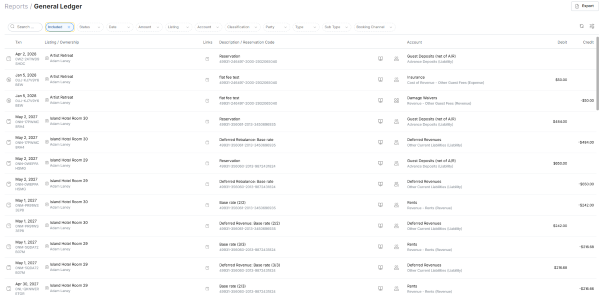
7. General Ledger Exports
A general ledger export is the complete, line-by-line record of every financial transaction posted in your system, in chronological order.
What it tells you: Everything. The general ledger is the source of truth from which all other reports are derived.
When to run it: For audits, tax preparation, or any time a report shows an unexpected number you need to trace back to its source.
What to look for:
- Transactions with missing or generic descriptions ("miscellaneous," "adjustment")
- Large round-number entries that aren't linked to an invoice or reservation
- Transactions posted to "suspense" or "uncategorized" accounts — these should always be zero
For your accountant: When transitioning to a new platform or preparing year-end filings, your accountant will likely request a general ledger export in CSV or Excel format. VRTrust can generate this for any date range.
Putting It All Together
No single report tells the complete story. Use them together:
- Daily: KPI dashboard
- Weekly: Unreconciled transactions, unit performance
- Monthly: Income statement, P&L, management income statement, owner statements
- Quarterly: Revenue vs. expenses summary, portfolio performance review
- Annually: General ledger export, year-end owner summaries, 1099 preparation
If you're currently running these reports manually, downloading CSVs, formatting spreadsheets, or building your own reports in generic accounting software, it's worth exploring whether your accounting platform can generate them automatically.
See how VRTrust handles financial reporting →
