


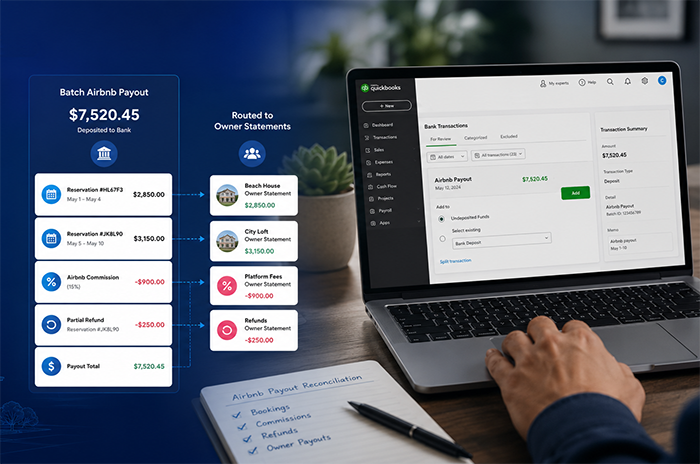
If you’ve tried reconciling Airbnb payouts in QuickBooks, you already know how messy it can get. Airbnb deposits rarely match individual reservations, payouts often bundle multiple stays together, and fees or adjustments can make the numbers even harder to track down. What starts as a manageable workflow with a few properties quickly becomes difficult to maintain once you’re handling 10+ listings and multiple owners.
This guide walks through how to reconcile Airbnb payouts in QuickBooks step-by-step, why Airbnb reconciliation is so challenging for vacation rental property managers, and how to simplify the process as your portfolio grows.
The Challenge with Airbnb Payouts
Airbnb doesn't pay you the way a tenant pays rent. There's no single check for a single stay arriving on a predictable date. Instead, Airbnb processes payouts in batches, which can make reconciliation difficult for property managers trying to match reservations, fees, and owner balances. Understanding the mechanics of how money actually flows from the guest to your bank account is the first step toward getting your books right.
Batch Deposits
Here's the core problem: Airbnb bundles multiple reservations into a single bank deposit. If you had three guests check in over a weekend, you might see one lump sum arrive in your account on Tuesday. That deposit represents the combined net payouts for all three stays, but your bank statement shows just one transaction with a generic description like "Airbnb Payments" or a reference number that doesn't obviously correspond to anything.
For property managers handling 10, 20, or 50 listings, a single deposit could contain revenue from a dozen different reservations across multiple properties owned by different people. Unbundling that deposit - figuring out exactly which reservations are included and how much each one contributed - is the fundamental challenge. Without breaking down these deposits properly, it becomes difficult to produce accurate owner statements or verify that payouts were allocated correctly.
Timing Differences
Airbnb typically releases payouts approximately 24 hours after a guest checks in, but the timing varies. Some payouts process faster; others get delayed by weekends, holidays, or payment processing quirks. A guest who books on Monday and checks in on Friday might generate a payout that doesn't appear in your bank until the following Tuesday.
This creates mismatches between your reservation calendar and your bank statement. You might have a reservation marked as "completed" in your PMS while the corresponding funds haven't arrived yet. Or the opposite: money appears in your account, but you can't immediately identify which reservation it belongs to because the dates don't line up the way you'd expect. These timing gaps are normal, but they make monthly reconciliation confusing if you're trying to match things by date alone.
Fees and Adjustments
Airbnb deducts its host service fee (typically 3%) before sending your payout. But that's just the beginning. You might also see deductions for resolution center charges, co-host payouts, currency conversion fees, or adjustments from guest refunds and cancellations. Each of these reduces the amount that actually hits your bank account.
The tricky part is that Airbnb doesn't always deduct fees from the same reservation they relate to. A resolution center charge from a dispute on Reservation A might get netted against the payout for Reservation B. If you're only looking at bank deposits, you'll never see these individual line items - they're buried inside the batch total.
Where Most Teams Go Wrong
The biggest mistake most property managers make is not fully reconciling Airbnb payouts at all. Instead, they rely on reservation totals inside Airbnb or their PMS and assume the money made it to the bank correctly. But reservation revenue and actual cash received are not always the same thing.
Airbnb payouts can be delayed, grouped together, reduced by fees, adjusted for refunds, or offset by other charges. If you aren’t regularly matching payouts against your actual bank deposits, it becomes easy for discrepancies to go unnoticed.
Another common issue is only reconciling at a high level. Someone sees a $4,200 deposit in the bank, finds a few reservations that roughly match the amount, and assumes everything is correct. But without breaking deposits down to the reservation level, it’s difficult to verify owner balances, fees, refunds, and adjustments accurately.
Timing also matters. Waiting until month-end to sort through weeks of Airbnb batch deposits quickly becomes overwhelming, especially during peak season, when reservation volume is at its highest. What could have been a simple weekly review turns into hours of manual cleanup, spreadsheet work, and unclear owner statements.
Why Airbnb Reconciliation Is Difficult in QuickBooks
QuickBooks works well as a general accounting system, but Airbnb reconciliation introduces a few challenges that QuickBooks wasn’t specifically designed to handle out of the box.
The biggest issue is that Airbnb payouts don’t map cleanly to individual reservations. Instead of receiving one payment per stay, property managers often receive batched deposits that combine multiple reservations, fees, refunds, and adjustments into a single bank transaction.
That creates several problems inside QuickBooks:
- One bank deposit may contain revenue from multiple listings and owners
- Airbnb service fees are deducted before payouts hit the bank
- Reservation dates and payout dates rarely align perfectly
- Refunds and adjustments may appear days or weeks later
- Owner balances become difficult to track manually
For property managers using spreadsheets alongside QuickBooks, reconciliation often becomes increasingly manual as reservation volume grows.
How to Reconcile Airbnb Payouts in QuickBooks (Step-by-Step)
Reconciling Airbnb payouts with your bank deposits requires working from the inside out. You start with Airbnb's own data, break it into individual components, and then match those components to what your bank received. Here's the process that actually works.
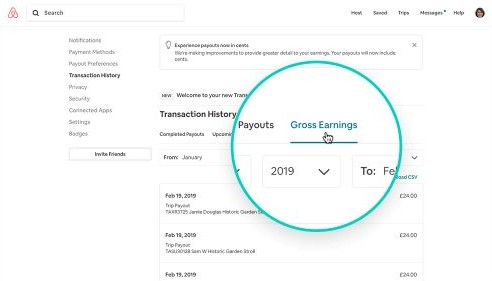
Step 1: Start with Payout Report
Log into your Airbnb host account and download the transaction history or payout report. This report is your source of truth for what Airbnb says it paid you. Each payout line shows the total amount sent, the date it was initiated, and a payout reference ID.
Export this data as a CSV file so you can work with it in a spreadsheet or import it into your accounting system. Pay attention to the payout status column: "completed" means the money was sent, while "pending" means it hasn't been released yet. Only completed payouts should appear in your bank account.
If you’re using QuickBooks, this payout report becomes the foundation for matching Airbnb deposits against transactions in your bank feed.
Step 2: Break Down Reservations
Each payout in Airbnb's report is linked to one or more reservations. You need to identify every reservation included in each payout and note the gross booking amount, the Airbnb service fee deducted, any resolution center adjustments, and the net amount for each stay.
This is the unbundling step, and it's where most of the real work happens. For a payout of $3,800, you might find it contains:
- Reservation 1 (Lakehouse): $1,200 gross, $36 service fee = $1,164 net
- Reservation 2 (Downtown Condo): $950 gross, $28.50 service fee = $921.50 net
- Reservation 3 (Mountain Cabin): $1,750 gross, $52.50 service fee = $1,697.50 net
- Resolution adjustment: +$17 credit from a previous dispute
Total payout: $3,800. Each component now has a clear source and destination.
Step 3: Match Airbnb Payouts to QuickBooks Bank Deposits
Take the payout amounts from Step 1 and find the corresponding deposits in your bank statement. In QuickBooks, this usually happens inside the bank feed or bank reconciliation workflow. The challenge is that QuickBooks only sees the final lump-sum deposit, not the individual reservations inside it.
That means property managers often need to manually break down deposits before they can reconcile them accurately.
Match by amount first, then confirm by date. The deposit date in your bank will usually be one to three business days after Airbnb's payout initiation date, depending on your bank's processing speed.
If amounts don't match exactly, check for currency conversion differences or bank fees. Some banks charge incoming wire fees that reduce the deposited amount. Flag any payout that doesn't have a matching bank deposit within five business days - this could indicate a processing issue or an error on Airbnb's side.
Step 4: Allocate to Listings & Owners
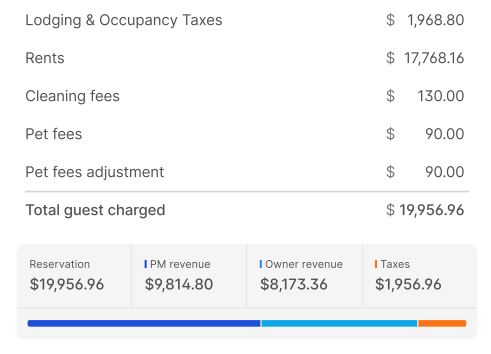
Once you've matched payouts to bank deposits, allocate each reservation's net revenue to the correct listing and property owner. This is where accurate trust accounting becomes important. Your records should clearly show which reservations, payouts, expenses, and balances belong to each property and owner.
For each reservation, calculate the owner's share after deducting your management fee, any property-specific expenses (cleaning fees you paid out, maintenance costs, supplies), and applicable taxes. The remaining balance is what the owner is owed. If you manage 30 properties for 15 different owners, this allocation step is the difference between professional financial management and guesswork.
Many property managers initially track these allocations in spreadsheets outside of QuickBooks because standard QuickBooks workflows don’t automatically separate Airbnb payouts by listing or owner.
Step 5: Reconcile Differences
Compare three numbers: what Airbnb says it paid, what your bank actually received, and what your internal ledger shows. This type of reconciliation helps property managers verify that their bank balance, accounting records, and owner balances all align. (Learn about three-way reconciliation for vacation rental property managers →)
Common causes of discrepancies include Airbnb adjustments that posted after you downloaded your report, bank fees that reduced the deposit amount, or data entry errors in your own records. Document every discrepancy and its resolution. If you're managing trust funds, regulators expect you to be able to explain any variance, no matter how small. Aim to complete this reconciliation weekly if you manage more than 20 units, or at minimum before every owner payout cycle.
How to Automate Airbnb Reconciliation
The manual process described above works, but it doesn't scale. Once you have more than 20 properties, the hours required to reconcile Airbnb payouts in QuickBooks each month start cutting into time you should be spending on guest experience and owner relationships.
Use a Purpose-Built Accounting System
Generic accounting tools like QuickBooks or Xero weren't designed to handle the specific challenges of vacation rental accounting. As portfolios grow, manually matching Airbnb payouts, allocating revenue by owner, and tracking balances across multiple listings becomes increasingly time-consuming and prone to errors.
Purpose-built vacation rental accounting systems help automate this process by syncing reservation data, bank activity, and owner balances together in one workflow.
This software can handle several critical functions:
- Automatic import of reservations, listings, and payment data from your PMS
- Bank feed integration that pulls in deposits and matches them to payouts
- Trust reconciliation that verifies the three-way match between your ledger, bank balance, and owner balances
- Automated owner statements showing revenue, expenses, and fees by reservation and by property
- A general ledger with entries generated automatically from reservation and payment data
Some vacation rental accounting platforms work in conjunction with QuickBooks while others replace it altogether. VRTrust can do both. Whether you want to use VRTrust for trust accounting only and sync summarized financial data directly into QuickBooks or manage all of your accounting in one system, VRTrust provides the level of financial automation that fits your business.
Outcome of a Clean Approach
When your reconciliation process is solid, whether manual or automated, several things change. Owner trust increases because you can produce accurate, detailed statements showing exactly how their revenue was calculated. Your own financial picture becomes clear: you know your actual management fee income, not an estimate. And you stay compliant with trust accounting regulations, which in many jurisdictions require you to demonstrate that owner funds are properly segregated and accounted for.
Clean reconciliation also catches problems early. If Airbnb underpays a reservation or double-charges a fee, you'll spot it within days instead of discovering it during a quarterly review (or worse, when an owner questions their statement). Property managers who reconcile weekly report catching an average of two to three discrepancies per month that would have gone unnoticed with less frequent reviews.
The compounding benefit is time. The first month of proper reconciliation takes the longest because you're building your process and cleaning up historical data. By month three, you have a rhythm. By month six, reconciliation becomes a routine check rather than a dreaded project.
Getting your reconciliation process right is one of those operational foundations that makes everything else in your business easier. Accurate books lead to confident owner conversations, clean tax filings, and the ability to actually understand your profitability per listing. If you're still wrestling with spreadsheets and manual matching, consider a tool designed for exactly this problem. VRPlatform automates trust accounting, bank reconciliation, and owner statements specifically for vacation rental managers, pulling data directly from your PMS and payment gateways. See how it works and reclaim the hours you're currently spending on spreadsheet gymnastics.
Answers to Common Questions About Airbnb Reconciliation in QuickBooks
How do I reconcile Airbnb payouts in QuickBooks?
To reconcile Airbnb payouts in QuickBooks, match Airbnb payout reports against bank deposits, then break down each batch payout into individual reservations, fees, refunds, and owner allocations.
Why don’t Airbnb payouts match my bank deposits in QuickBooks?
Airbnb payouts often bundle multiple reservations together and deduct fees or adjustments before deposits hit your bank account.
Can QuickBooks automatically reconcile Airbnb payouts?
QuickBooks can reconcile bank deposits, but most vacation rental managers still need additional workflows or software to break down Airbnb batch payouts by reservation and owner.
When do vacation rental managers outgrow spreadsheets for reconciliation?
Many property managers begin struggling with manual reconciliation once they manage more than 10–20 properties due to the growing volume of reservations, payouts, and owner transactions.
