



Revenue recognition decides which month a reservation's revenue lands in, and so which owner statement it appears on. VRTrust offers four options for when reservation revenue is recognized:
- Check-in: all revenue in the month the guest arrives
- Check-out: all revenue in the month the guest leaves
- Pro-rata: revenue split evenly across each night of the stay
You set a default under Settings → Accounting Preferences, and you can override it for individual line types such as cleaning fees. You can change the method later, but the change only applies to periods and reservations that aren't locked, so earlier statements stay as published.
Revenue recognition methods compared
The three methods only differ for reservations that cross a month boundary.
Here's one reservation under each method: a 5-night stay checking in January 28 and out February 2, with $1,000 in rent.
Whichever you choose, write it into your management agreements so owners know which month to expect revenue in.
Why does revenue recognition matter for owner statements?
It determines which reservation revenue appears on which monthly owner statement. The same booking can show up in January, February, or both depending on the method. None of these is wrong, but the method has to match your management agreement, or owners will ask why their statement doesn't match their booking calendar.
It also has to be consistent. Mixing methods across properties makes portfolio reports unreliable and makes three-way reconciliation harder, because trust balances, owner ledgers, and the general ledger stop lining up month to month.
How do you set revenue recognition in VRTrust?
Set it once, before you publish your first owner statements.
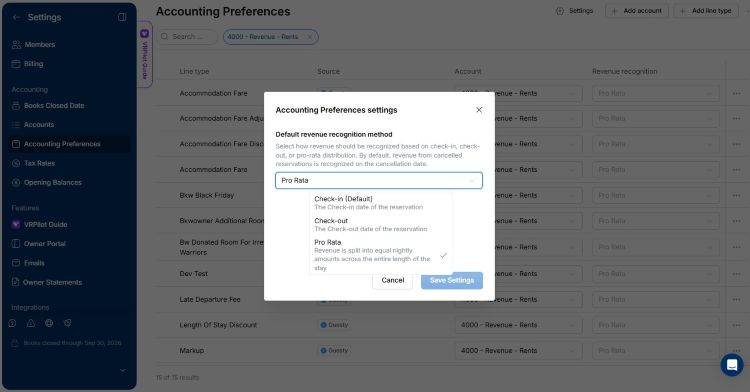
- Go to Settings, then Accounting Preferences.
- In the upper right hand corner, click the Gear icon to open the Revenue Recognition Settings, then choose Check-in, Check-out, or Pro-rata.
- To treat a specific line differently, select that PMS line type from the table (for example, Cleaning Fee) and select the revenue recognition method to apply to that line item.
If you change the method after statements are published, VRTrust applies it only to unlocked periods and reservations. Locked periods and reservations keep the treatment they were published with, so past owner statements don't change.
Can different reservation lines use different methods?
Yes. Each PMS line type can override the default. When a line's method differs from the default, VRTrust records the timing difference as deferred revenue.
For example, a guest checks in December 30 and out January 2, with $1,000 in rent and a $200 cleaning fee. The default is Check-in and the cleaning fee is set to Check-out:
- December 30: $1,000 of rent is recognized; the $200 cleaning fee is held in Deferred Revenues.
- January 2: the $200 moves from Deferred Revenues to Cleaning Fees.
The owner sees $1,000 of rent on the December statement and the $200 cleaning fee on the January statement.
Does VRTrust use cash or accrual accounting?
VRTrust records reservations in a general ledger and recognizes revenue on the date your recognition setting picks, not when the payout lands. Guest payments received before that date sit in Guest Deposits until the revenue is recognized. (Understand the difference between cash basis and accrual accounting)
How should long-term stays be handled?
If most of your bookings are a few nights but some run 30+ nights, recognizing revenue at Check-in puts a long stay's full revenue on one statement, while Pro-rata splits every reservation, including one- and two-night stays.
Which month do Airbnb resolutions and other adjustments land in?
The month of the adjustment's posting date, which you can change. Record Airbnb resolution payouts, damage reimbursements, pet fees, and other guest-related amounts as a financial adjustment on the reservation. Set the posting date to control which owner statement it appears on.
- Open the reservation and go to its Financials.
- Add a financial adjustment with a description (for example, "Airbnb resolution") and the amount.
- Optionally, override the posting date.
Financial adjustments go to the owner by default. If the money belongs to you as the manager, add a fee for the same amount in Fees & Commissions, charged to the owner and paid to the property manager.
How do you check guest balances before closing the month?
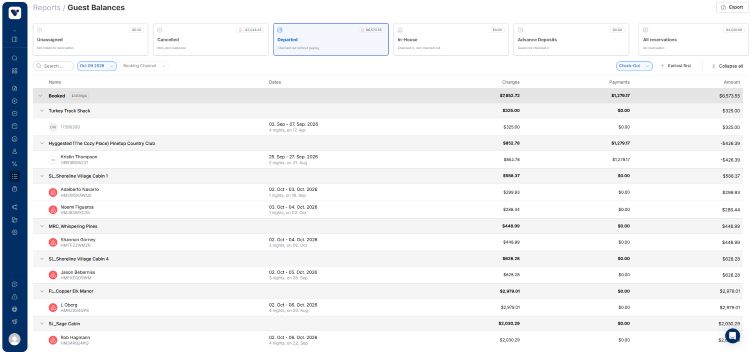
Use the Guest Balances report. It shows each reservation's charges, payments, and balance as of a date you pick, grouped by status, so you only open the ones that don't add up. (Learn more about financial reports in VRTrust)
- Go to Reports and open Guest Balances.
- Pick your month-end date and click Apply.
- Work through each view:
- Departed: should all be $0. Any balance means a missing payment, refund, or adjustment.
- Cancelled: cancelled reservations with money still on them. Refund the guest or keep it as cancellation income; you can apply a cancellation fee to several at once.
- In-House: should be close to $0, since payment is usually collected by arrival.
- Advance Deposits: money received for future stays. This is expected and should match the Guest Deposits balance on your trial balance.
- Unassigned: payments not yet linked to a reservation. Match them before you close.
Open a reservation only when the report flags it, then compare its Financials with its Payments / Refunds and add a financial adjustment if something's missing. You can also filter by channel, search by guest, and export the report to CSV.
Frequently asked questions
What revenue recognition methods does VRTrust support? Check-in, Check-out, and Pro-rata. You set a default for all reservations and can override it for individual PMS line types.
Can I change my revenue recognition method later? Yes. The new method applies only to unlocked periods and reservations; locked ones keep their original treatment, so published statements don't change.
Which revenue recognition method is best for vacation rentals? It depends on your management agreements. Check-in is the most common for short stays. Pro-rata suits portfolios with many month-spanning or mid-term stays. Use one method consistently across your portfolio.
What is pro-rata revenue recognition? Pro-rata splits a reservation's revenue evenly across each night of the stay. A 5-night stay with 4 nights in January and 1 in February puts 80% of the revenue on January's statement and 20% on February's.
Why does the same reservation show up in different months? It depends on the recognition date. A stay that starts January 28 and ends February 2 lands in January under Check-in, February under Check-out, and is split between both under Pro-rata.
Get revenue recognition right from day one
VRTrust applies your recognition rules to every reservation automatically, so owner statements, PM statements, and trust reconciliation stay in sync.
- Three recognition methods, with per-line overrides and automatic deferred revenue
- PMS integrations that bring in reservation lines, fees, and channel commissions
- Financial adjustments for resolutions, damages, and corrections, posted to the right reservation
Our onboarding team helps you choose your recognition settings before your first close.
Book a demo or get started with VRTrust!
