


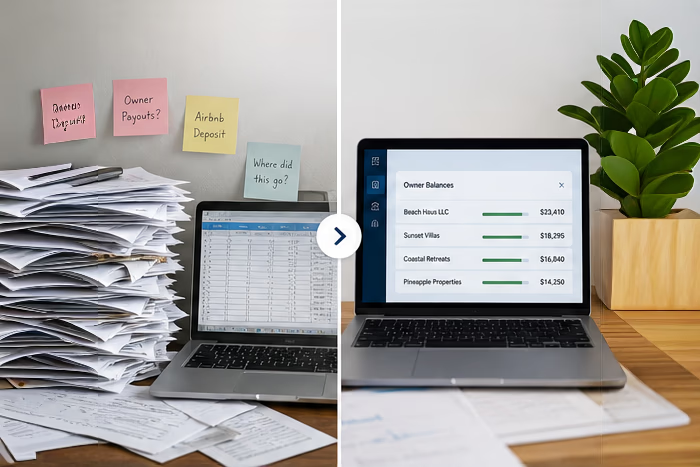
How to Transition from QuickBooks or Spreadsheets to a Purpose-Built Accounting Platform
Growth is exhilarating for any organization, yet it often exposes the cracks in systems that once felt perfectly adequate. Many property-management and vacation-rental businesses launch with familiar tools like QuickBooks or a collection of spreadsheets, believing these low-cost solutions will scale indefinitely. Reality soon intervenes: increasing transaction volume, multiple bank accounts, owner statements, and compliance obligations transform once-simple workflows into a maze of manual steps. This article shows how to move from legacy methods to a purpose-built accounting platform without disrupting day-to-day operations, protecting data integrity, or losing the momentum that has fueled your success so far.
Understanding the Limitations of Current Systems
General-purpose accounting tools succeed when the chart of accounts is compact and the number of monthly transactions stays in the hundreds. As operations expand into new markets, a single property manager can find themselves juggling tens of thousands of line items each quarter. QuickBooks can, of course, store all that data, yet the user experience and reporting engines were not designed with unit-level detail or nuanced revenue-sharing agreements in mind. This limitation can lead to significant inefficiencies, as property managers may find themselves spending excessive time on data entry and reconciliation rather than focusing on strategic growth initiatives.

Spreadsheets, on the other hand, are nearly impossible to audit at scale. One accidental cell overwrite can silently corrupt revenue allocations for months. While version history helps, the time required to trace an error from a single comma misplaced in a VLOOKUP to an owner payout several weeks later is time that could be spent improving guest satisfaction or optimizing marketing spend. Moreover, the reliance on spreadsheets can create a culture of risk aversion among staff, as employees may hesitate to make necessary updates for fear of inadvertently introducing errors that could have cascading effects on financial reporting.
Common Pain Points with QuickBooks for Growing Businesses
QuickBooks Desktop and QuickBooks Online dominate small-business accounting, but neither natively tracks money at the reservation level.
Pain Point #1: Manually importing data from spreadsheets
Property managers often create a dense forest of customer sub-accounts or export data into Excel, then re-import summary journals. That workaround is slow, fragile, and undermines the real-time visibility leadership teams crave. This lack of immediacy can hinder decision-making processes, as managers may be forced to rely on outdated information when evaluating performance metrics or making budgetary adjustments.
Pain Point #2: Trust account reconciliation
Vacation rental accounting requirements in several U.S. states mandate three-way reconciliation: bank ledger, owner ledger, and booking ledger must match to the penny. Achieving this in QuickBooks requires layers of memorized reports, class tracking, and manual journal entries. Miss one correction and staff can spend hours retracing their steps to find the mistake.
Additionally, the complexity of these reconciliations can lead to employee burnout, as team members grapple with the pressure of ensuring accuracy amidst an ever-increasing volume and complexity of transactions.
Pain Point #3: Separation of funds
Trust accounting best practices dictate that trust and operating funds need to be held separately. In a system like QuickBooks, this usually means property managers are constantly switching between company files and paying for multiple subscriptions, which quickly becomes a drain on both patience and budget. This fragmentation can also lead to inconsistencies in reporting, making it challenging to present a unified financial picture to decision-makers.
Why Spreadsheets Become Unsustainable at Scale
Spreadsheets begin as flexible helpers: a quick pivot table for occupancy trends, a calendar exported from Airbnb, or a simple cash-flow forecast. The problem is not the tool itself but the hidden dependencies that grow over time.
One workbook links to another; macros reference sheets that only one employee understands. When that employee leaves, institutional knowledge walks out the door as well. This loss can create a knowledge gap that is difficult to bridge, leading to delays in critical reporting and analysis that can impact overall business performance.
Auditability is also weak. Stakeholders want to know who changed which number and why. Excel’s Track Changes can catch some edits, yet it is no substitute for a system that logs every adjustment with a user ID, timestamp, and reason code.
Furthermore, the lack of a robust audit trail can expose organizations to compliance risks, as regulatory bodies increasingly scrutinize financial practices and demand transparency in reporting. The reliance on spreadsheets can thus not only hinder operational efficiency but also jeopardize the trust of investors and clients who expect accountability and accuracy in financial disclosures.
Evaluating Purpose-Built Accounting Platforms
Modern accounting platforms address these pain points by embedding best practices directly into the software. For vacation rental managers, that means automated reservation syncing, trust accounting workflows, and owner statement generation out of the box. Vendors have added direct bank feeds, automated payment disbursements, and granular permission controls so staff only see data relevant to their roles.
Evaluation should start with a detailed requirement list. Map every current task—guest invoice creation, damage deposit handling, sales-tax remittance, month-end owner statements—to its equivalent in the new platform. Ask each vendor to demonstrate not only how the process works but also how exceptions are handled. For instance, can the system correctly refund a canceled booking that straddles two fiscal periods?
A guide for teams migrating from general accounting tools to vacation-rental specific software like VRTrust
A successful implementation hinges on people, process, and technology moving together.
Step 1: Establish who will lead the migration
Begin by designating an internal “migration champion”—typically the controller or senior accountant—who understands both the current workflow and the strategic goals of adopting specialized software.
Step 2: Define key stakeholders
Then, thechampion should create a stakeholder map: operations, reservations, housekeeping, owners, and finance all rely on accounting data in different ways.

Step 3: Plan the migration
Next, develop a phased rollout plan. Start by understanding how reservation data will flow from the PMS into the accounting system. This might include importing your current chart of accounts or starting from scratch, but the goal is to have a clear mapping of each reservation line item to its designated bucket.
Once that's established, configure bank account connections, payout accounts, and owner statement templates.
Key Features to Look for in Modern Accounting Software
A general ledger built around the flow of funds from reservation to payout is the hallmark of good vacation rental accounting software. Each booking becomes its own mini ledger, holding rent, taxes, fees, and refunds. This design eliminates the need for complex classes or sub-accounts in QuickBooks.
Integrated three-way reconciliation is another must-have. The system should compare bookings, owner balances, and bank activity automatically, flagging discrepancies instantly.
The platform should also support trust and operations accounting without commingling, role-based permissions, and API endpoints for connecting to external software.
Comparing Top Solutions for Different Business Needs
Small portfolio managers—typically under 25 properties—prioritize affordability and ease of setup. They might choose a lightweight cloud solution that bundles accounting with a basic property management system.
Mid-size operators, managing anywhere from 26 to 500 units, often gravitate toward platforms like VRTrust or GetClearing, which balance advanced accounting workflows and reporting with intuitive interfaces.
Enterprise brands surpassing 500 units need robust permission matrices, custom reporting, and direct data lake integrations. They frequently combine enterprise-grade tools such as Sage Intacct or NetSuite with industry-specific accounting systems to consolidate their financials and integrate with operational workflows.
Planning and Executing a Successful Migration
The migration process should unfold like a well-managed project, complete with milestones, risk assessments, and communication plans.

Creating a Data Migration Strategy and Timeline
1. Data Audit: identify every data source, the format it arrives in, and the frequency of updates.
2. Data Cleanup: remove any duplicates or resolve data inconsistencies
3. Data Extraction: Export chart of accounts, opening balances, owner ledgers, and unpaid invoices. Verify that every export ties back to a point-in-time report generated in QuickBooks or the legacy spreadsheet.
4. Data Transformation: Map old GL codes to the new system’s structure. Use lookup tables and scripting tools to avoid manual re-keying. Many platforms provide a migration assistant that uploads CSV files and highlights mapping conflicts in real time.
5. Data Loading: Import historical data chronologically, then conduct a trial balance comparison. Discrepancies under a predefined threshold—say, $1 per owner ledger—can be adjusted; larger variances warrant root-cause analysis before continuing.
6. Validation and Sign-Off: Department heads sign off on their respective data sets. Only after unanimous approval should the team schedule the final cutover, ideally at month-end to align with standard reporting cycles.
Training Your Team and Optimizing New Workflows
Even the most elegant software fails without user adoption. Here are a few ways to get your team familiar with the new system:
- Combine vendor-led webinars with customized SOP documents reflecting your company’s naming conventions and approval hierarchies.
- Encourage staff to log questions in a shared channel so answers benefit everyone.
- Celebrate quick wins—such as a reconciled trust account in minutes rather than hours—to reinforce the value of the new system.
Ready to elevate your vacation rental accounting to the next level?
VRTrust is your go-to solution for automated end-to-end short-term rental accounting, ensuring trust accounting compliance and enhancing transparency between property managers, accountants, and owners. With features like detailed owner statements, PMS integration, ACH payouts, and trust and operating account reconciliation, VRTrust is designed to save you time and reduce errors, allowing you to focus on growing your business.
Don't let manual accounting hold you back. Get started with VRTrust today and experience the difference a purpose-built accounting platform can make.
